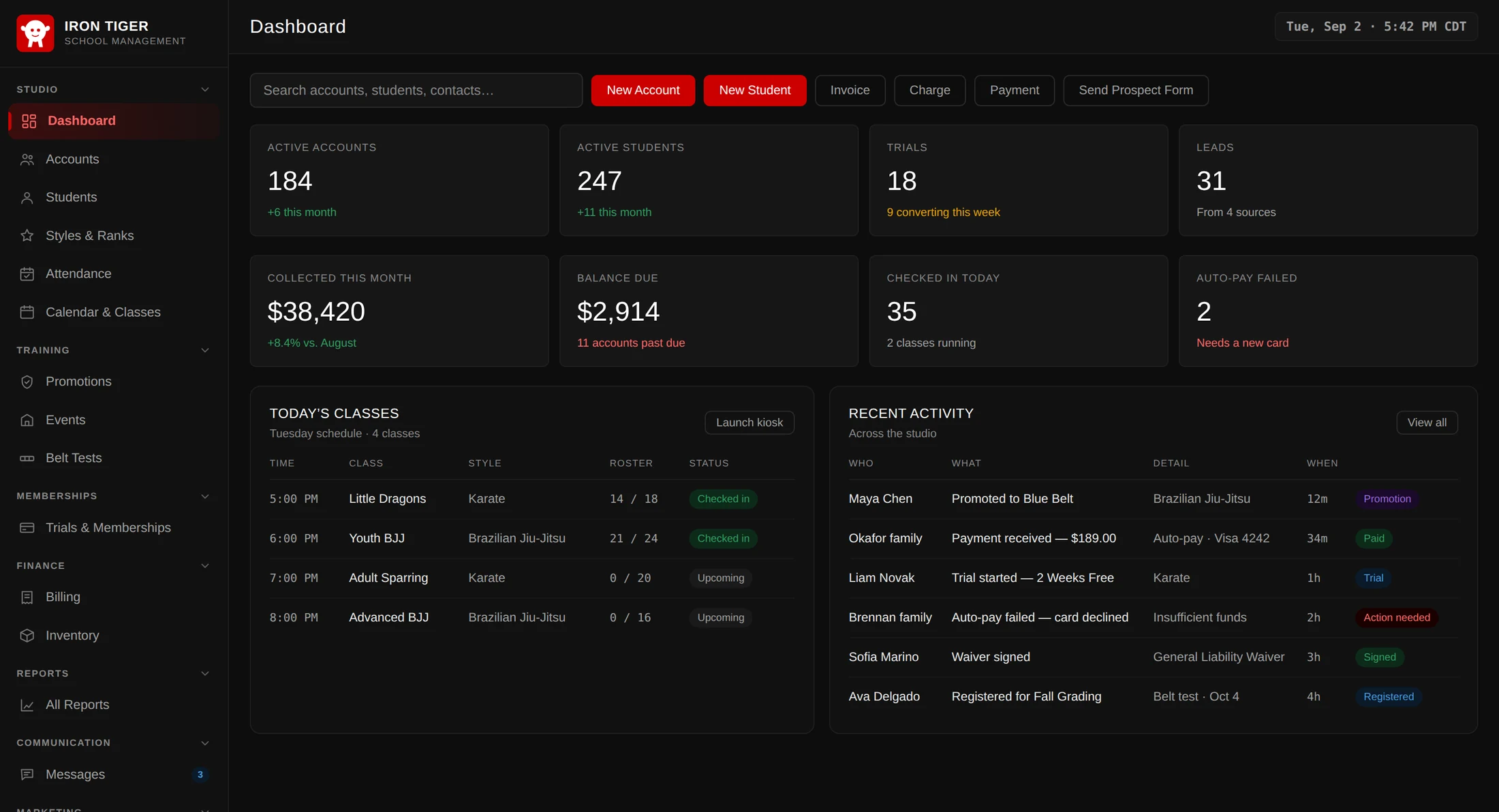
Axion Dojo is the all-in-one platform martial arts schools run on — students,
attendance, ranks, billing, and the parents' own login, in one place. Your front desk, your
instructors, and the families at home all look at the same information.
5Ways to take money — card, bank, Cash App, cash, check
3Staff roles, each with its own access
1Payout account — your own, not ours
What's inside
Everything you need to run a school
One platform for students, classes, ranks, billing, and communication — no spreadsheets, no juggling apps.
Students & families
One account per family, with every student under it and one balance across all of them. The whole lifecycle — lead, trial, active student, alumni — is tracked as it happens, and every account keeps a running history of what was done and who did it.
Attendance & check-in
Mark a whole row of students in from the desk, or put a tablet by the door and let them check themselves in. Filter the attendance log by date, class, style, rank or member type to answer who has not trained in a month.
Styles, ranks & belt tests
Build a rank ladder per discipline — a blue belt in one is not a blue belt in the other. Run a grading end to end: register candidates, set the fee, record who passed. Passing promotes the student, so you never enter it twice.
Billing & payments
Memberships bill themselves on a nightly run. Take card, bank (ACH), Cash App Pay, cash or check, keep a method on file for auto-pay, and see the payouts landing in your bank. Money moves through your own Stripe account, straight to your bank.
Messages that stay in one thread
Email, text and in-app messaging, kept as one conversation per family so the next person on the desk can see what was already said. Announcements reach everyone at once, and anyone who opts out is left out automatically.
Reports that answer real questions
Eight reports across money, students and attendance — what you collected, what you billed, who left, which lead sources actually produce members, and how a grading went. Every one filters by period, style and age.
The front desk
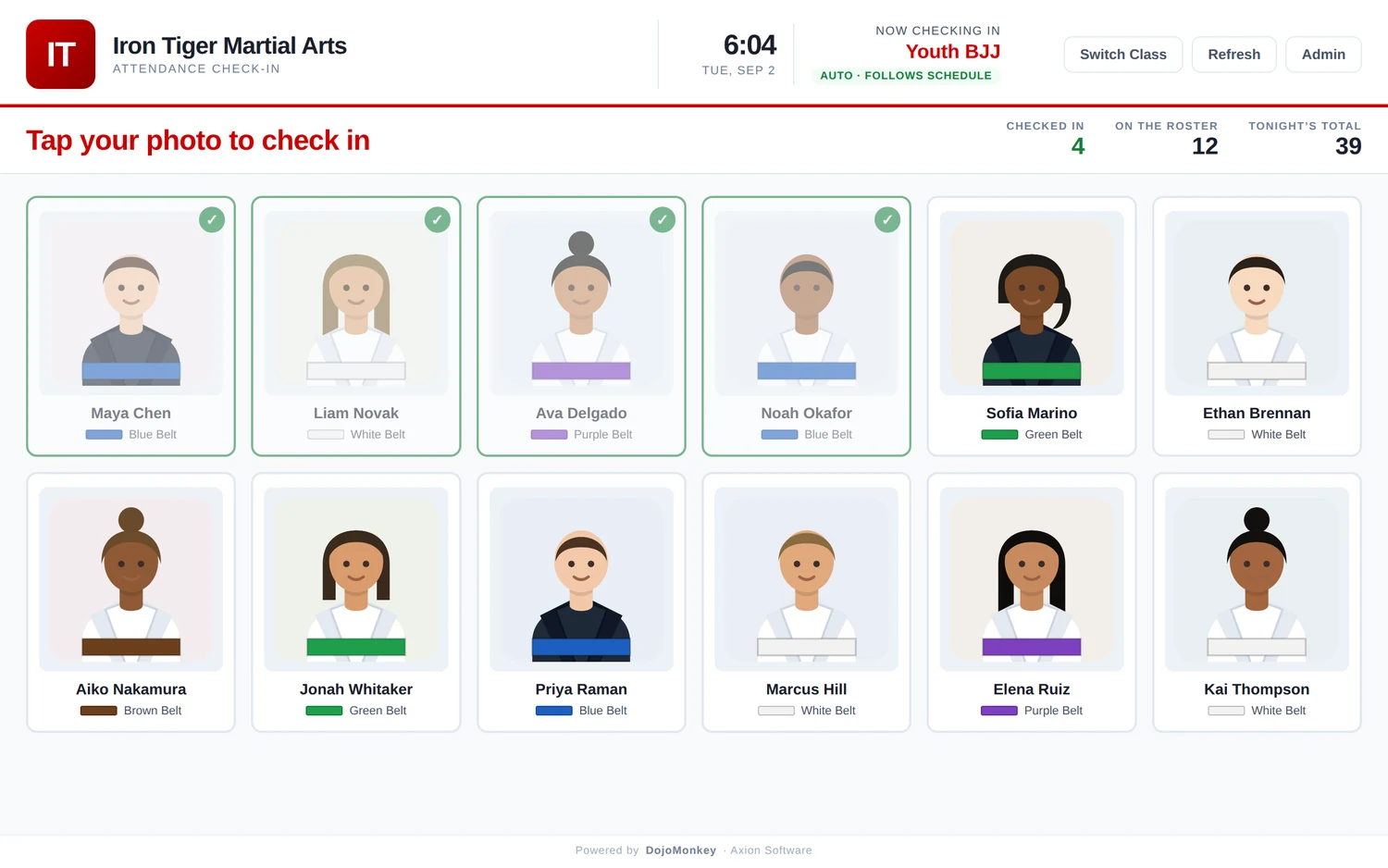
Let the class check itself in
Put a tablet by the door and the queue at your desk disappears. Students tap their own photo — no PIN, nothing for a seven-year-old to forget.
Follows your timetable on its own, or switch class by hand
Stays open all week — it will not sign itself out mid-evening
Tonight's numbers on screen as the night runs
Admin and exit sit behind a staff PIN, so nobody wanders out of it
Attendance kiosk — front door tablet
Money
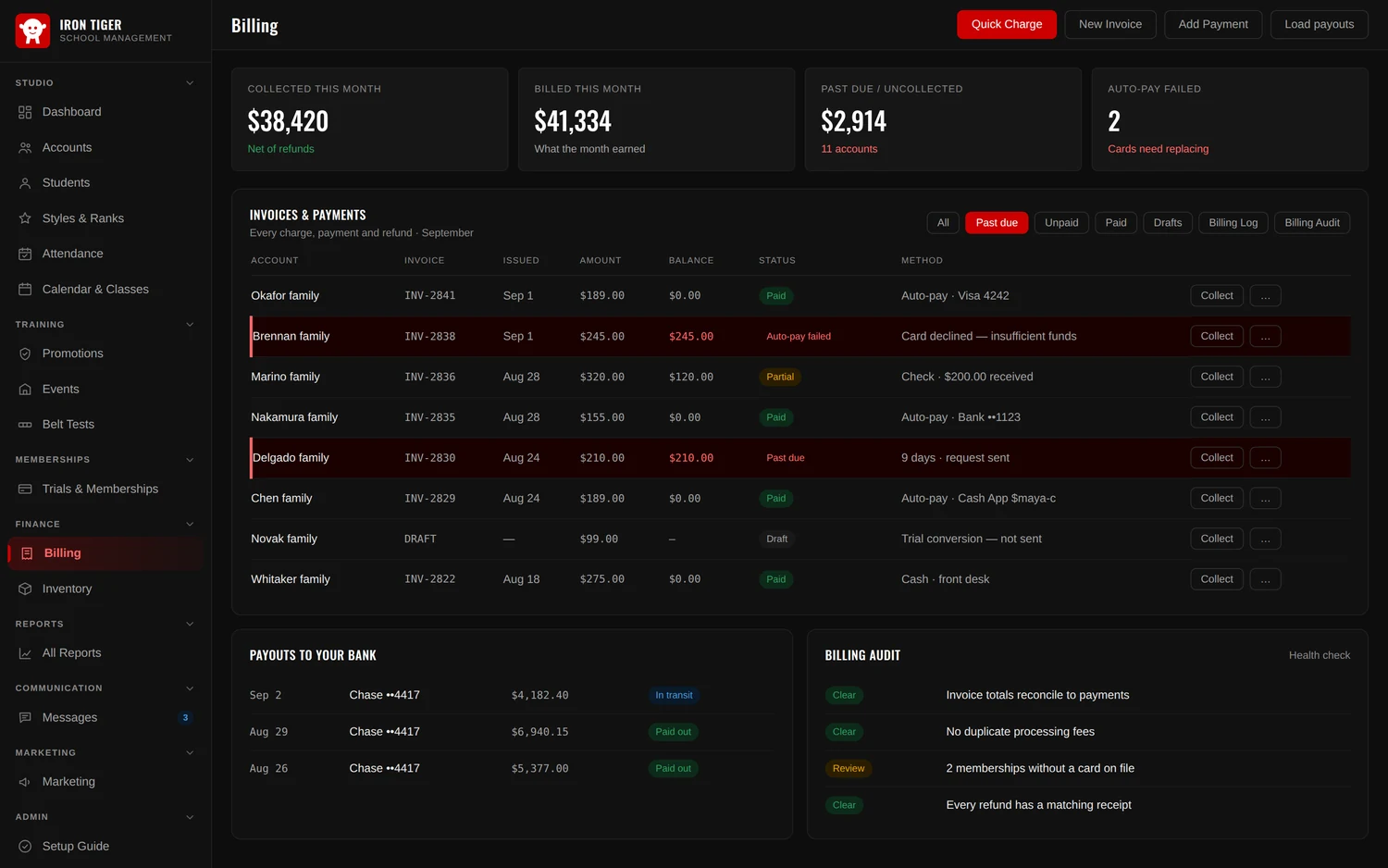
Get paid without chasing
Memberships raise their own invoices overnight and charge the method on file. What you see is the exception, not the routine — the two families whose payment just failed, and the eleven who are behind.
A declined card gets its own Auto-pay failed flag — it can never hide as “waiting”
Collect from the list without opening the account
Cash App Pay sits alongside card and bank — approved once, it becomes a saved method that auto-pay can charge like any other
Payouts to your bank, with arrival dates, for reconciling
A billing audit that flags anything that does not add up
Refunds keep their paperwork — a receipt, not a quiet erasure
Finance › Billing
New
For the families
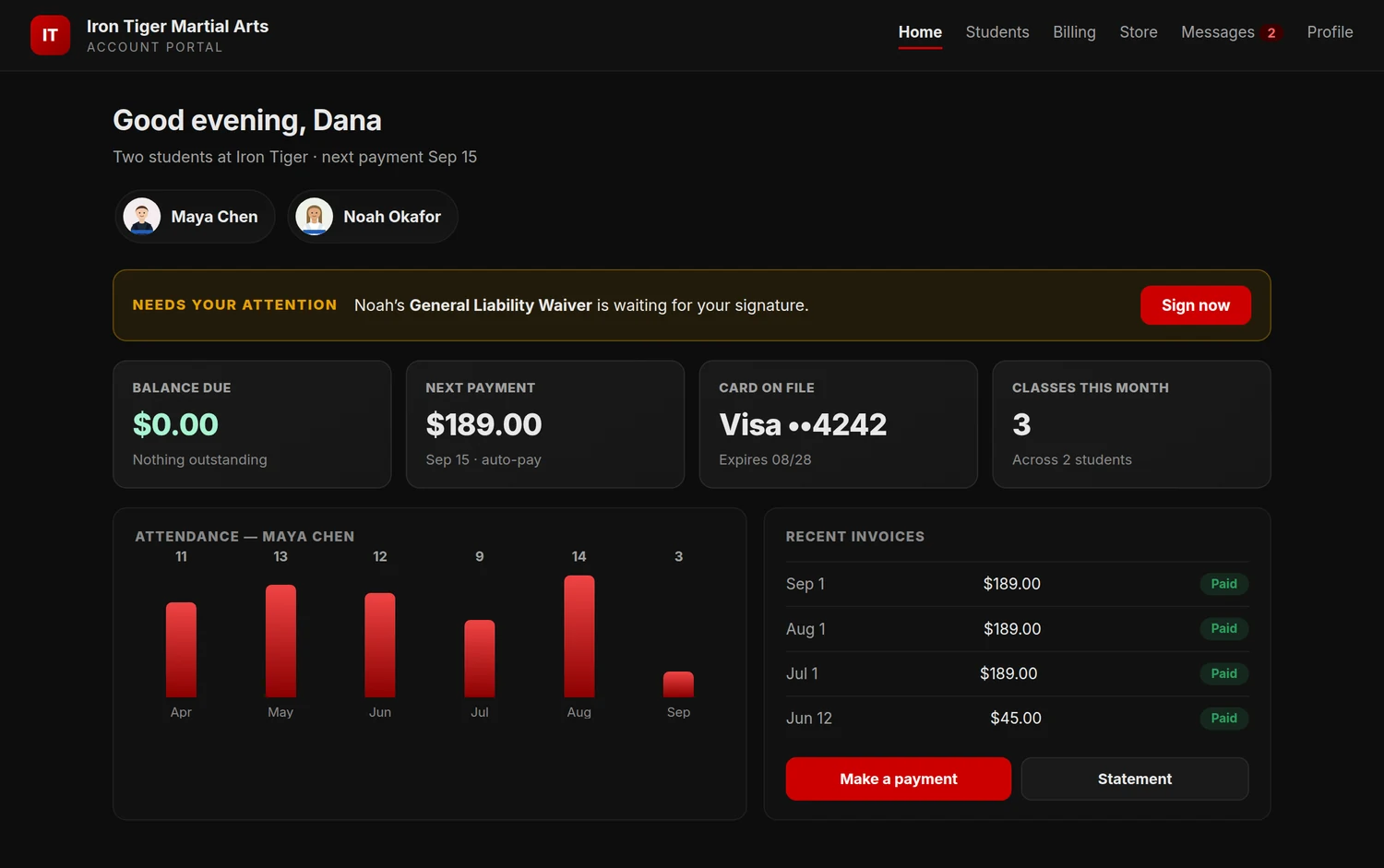
Parents answer their own questions
Every family gets their own login. The three questions your desk fields all day — what do I owe, when is the next payment, did my child train last week — they can now answer themselves.
Their balance, next payment, invoices and statements
Their card, bank or Cash App on file, which they update themselves — this alone prevents a lot of failed payments
Each student's attendance and current rank
Waivers waiting to be signed, and your store with a cart
An access log of portal sign-ins — which matters in a separation
The family's own login
New
In the lobby
A screen at the front desk that serves itself
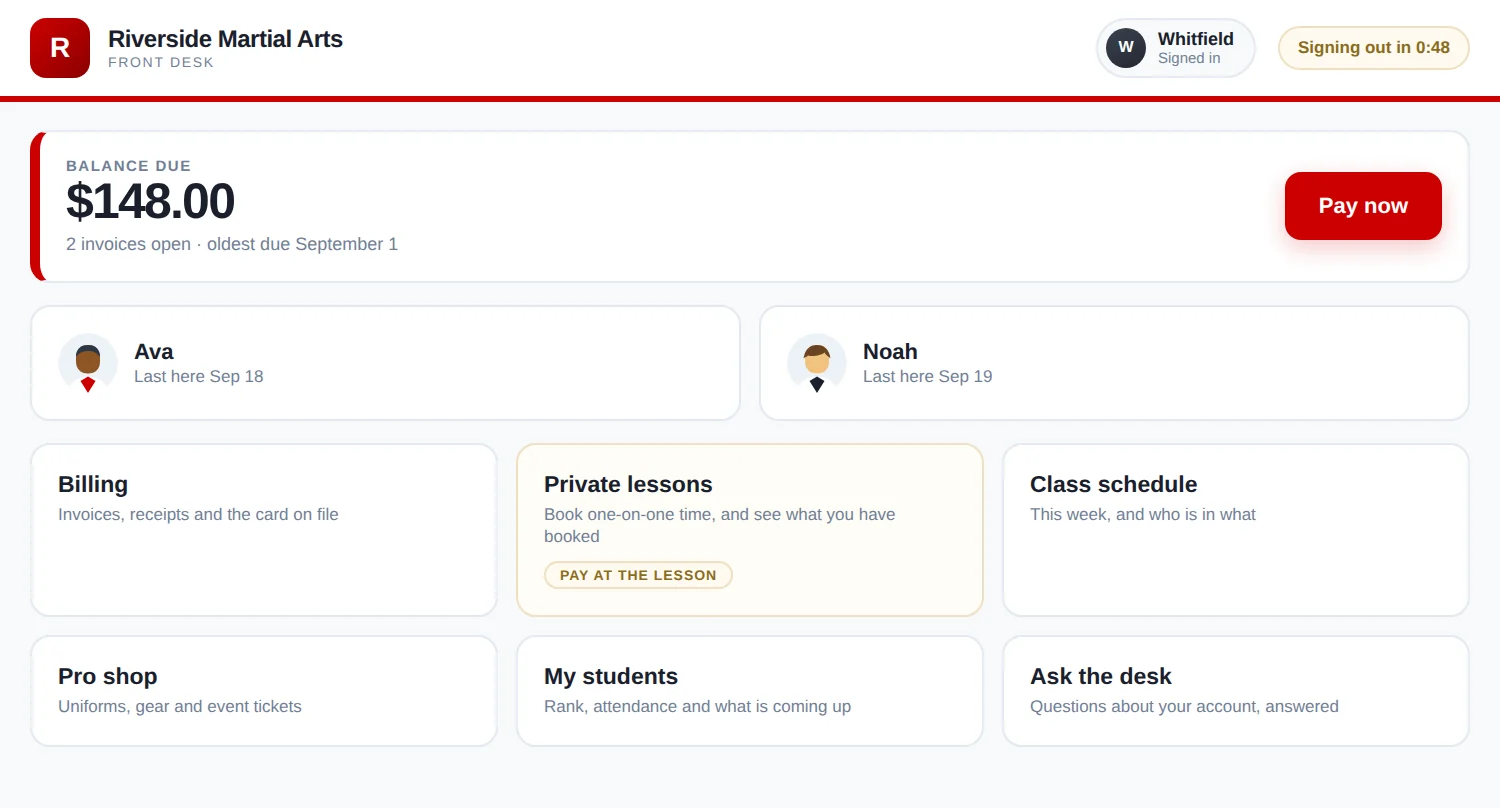
Put a tablet on the counter. Families sign in with the phone number you already have for them, settle what they owe, book a private lesson and read the week's schedule — while you are on the mat teaching.
What they owe is the biggest thing on the screen, with a button to pay it
A code by text or email proves it is really them before any money moves
Book a private lesson from an instructor's open times, paying online or at the lesson
Walk-ins who do not train with you yet get their own way in, including event sign-ups
It signs itself out after a minute, so the next person never lands in somebody else's account
The tablet on your counter
Training
Rank, tested and recorded
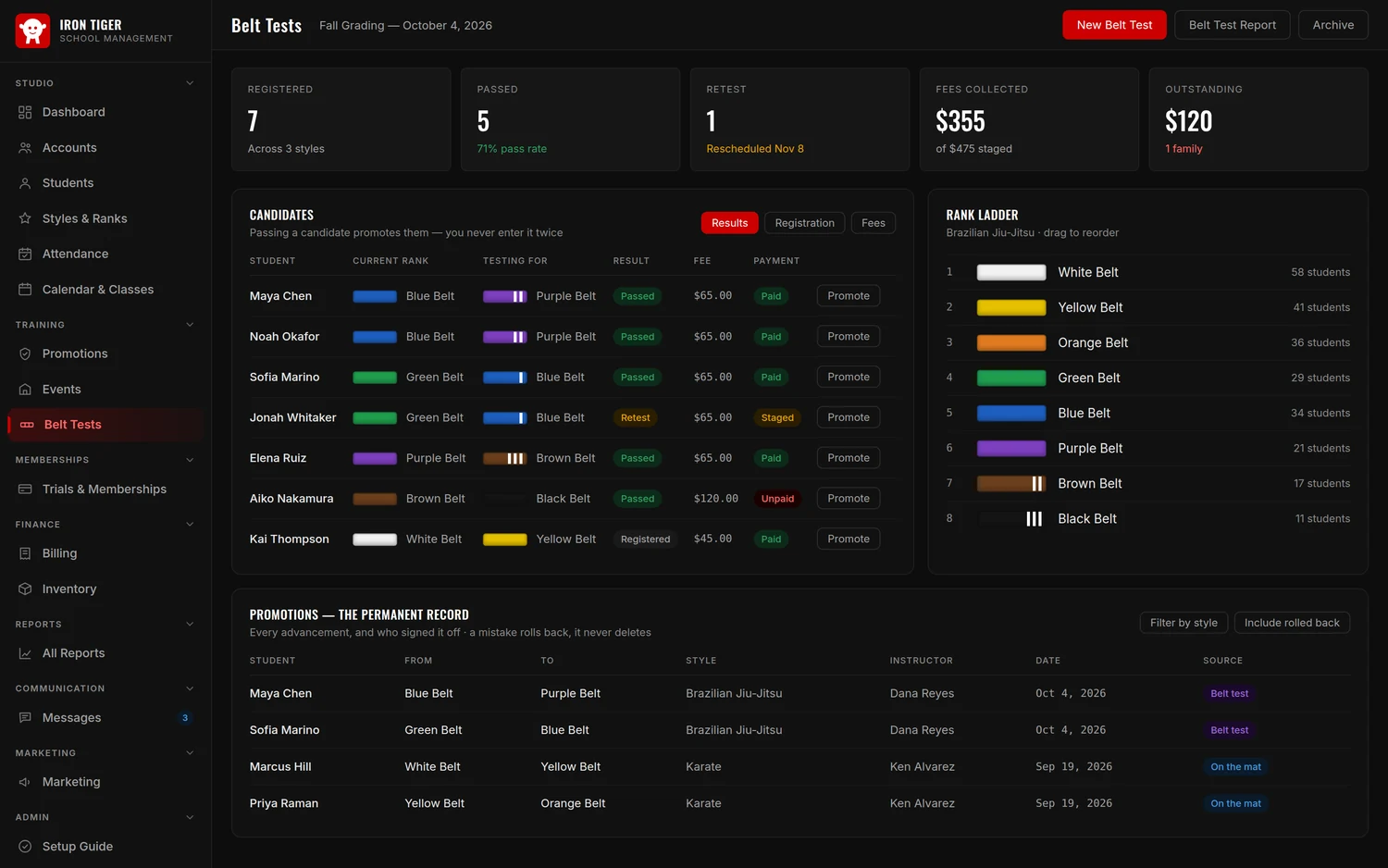
Build the ladder your school actually promotes through, then run gradings against it. Marking a candidate as passed promotes them — the record writes itself.
A separate rank ladder per style, drawn the same way everywhere in the app
Testing fees billed to each family's account, tracked to paid
A Belt Tests report: pass, fail and retest rates, fees collected and still owed
A promotion entered by mistake rolls back — it never quietly deletes
Training › Belt Tests
Running the place
The numbers owners actually ask for
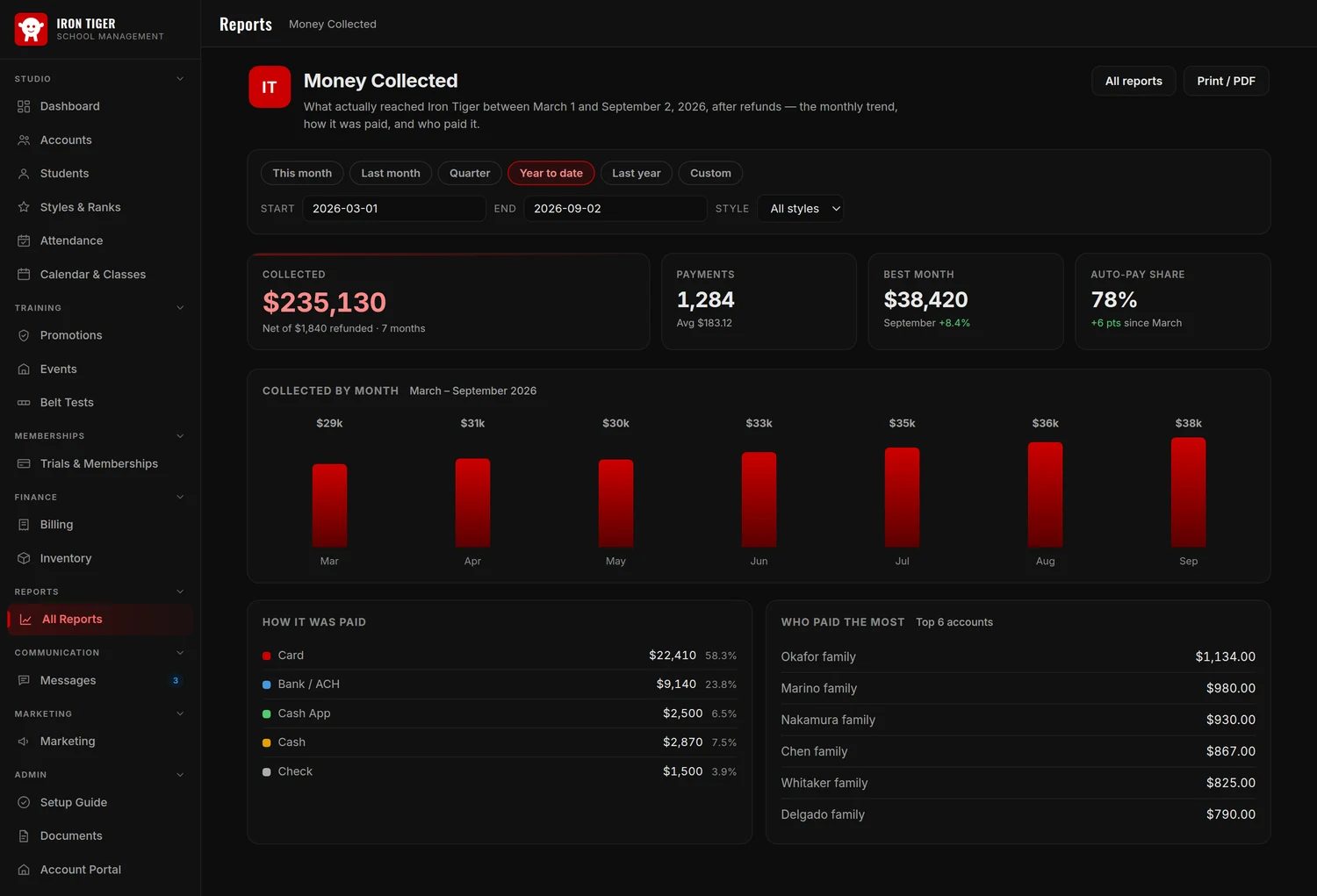
Not a wall of charts — eight reports, each named after a question. Money Collected is cash in the door. Money Billed is what the period earned. Both are right, and the gap between them is the thing to watch.
Every report takes a period and filters, and prints to PDF on your letterhead. Revenue is reported on your calendar, in your timezone — not the server's.
Reports › Money Collected
On the mat
Built for standing up, not sitting down
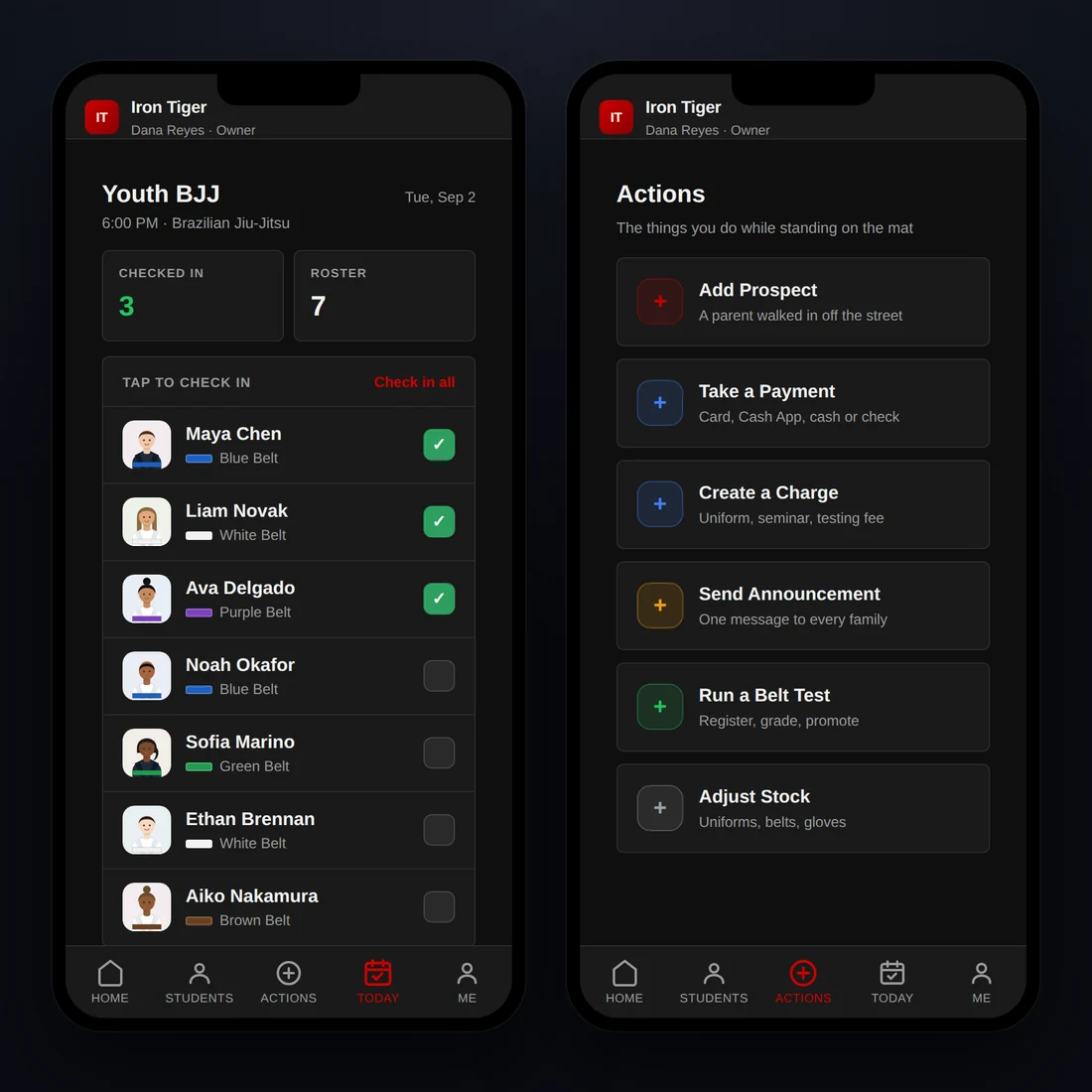
The mobile app is not a shrunken copy of the desktop site. It carries the handful of things you actually do while moving around the room — and it installs to the home screen like an app.
Check the class that is running right now into attendance
Add a prospect when a parent walks in off the street
Take a payment or raise a charge on the spot
Run a belt test, adjust stock, send an announcement
Each staff member is set to desktop, mobile, or both — an instructor who only checks people in can have mobile alone
New
Your website
Keep your website. Plug it into your data.
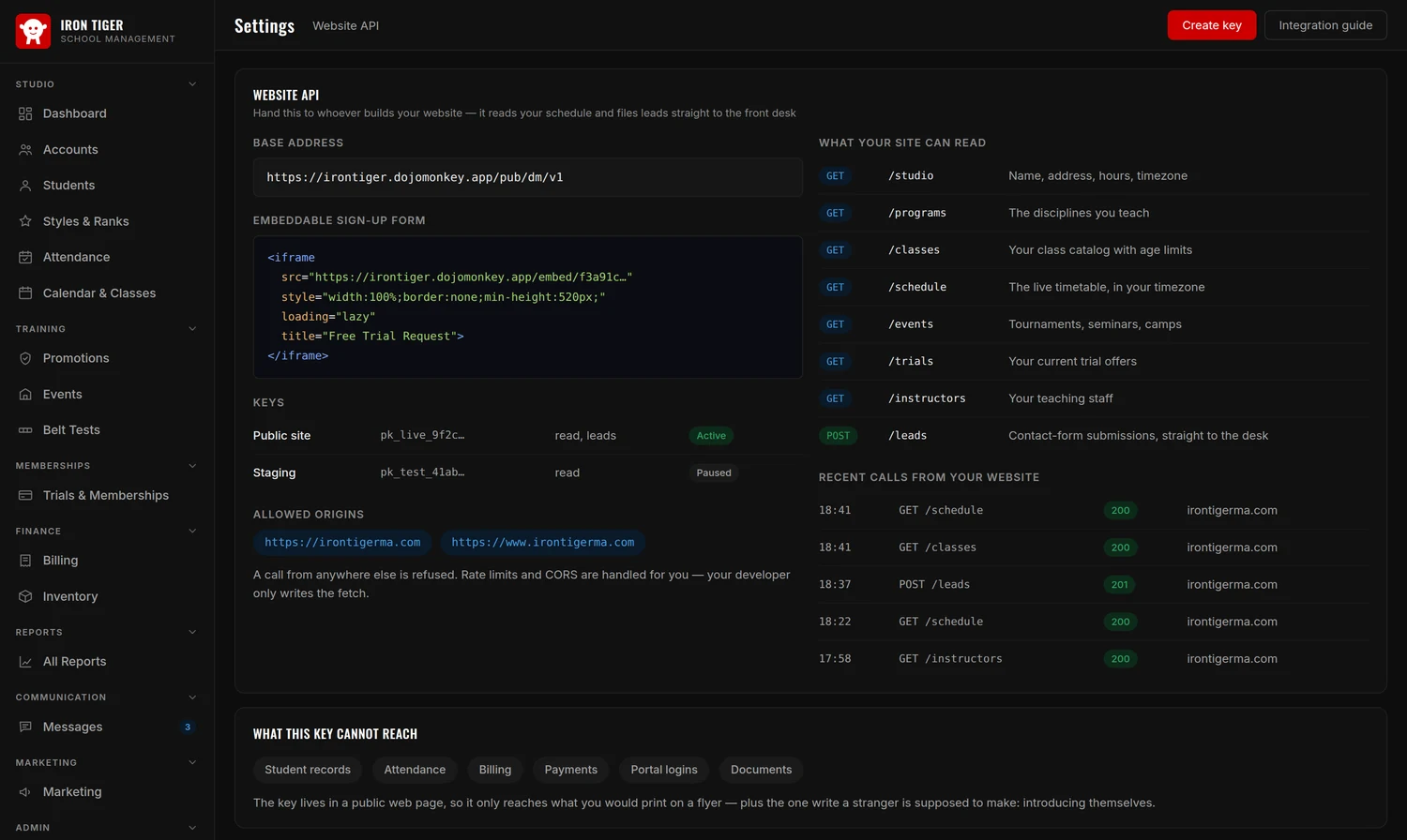
You already have a site, and it already looks like your school. Axion Dojo gives it a live connection instead of asking you to rebuild it somewhere else — your real schedule on your real pages, and enquiries landing at the front desk instead of an inbox nobody checks.
Your site reads classes, schedule, programs, events, trial offers and instructors — live
A sign-up form you paste into WordPress, Squarespace or Google Sites
A shareable prospect link for social, an email, or a QR code on a flyer
An email the moment someone signs up, sent to whoever you choose, with texts too once texting is on for your school
A printable integration guide to hand your web developer — and a call log for when something is not working
The key sits in a public web page, so it only reaches what you would print on a flyer. Student records, attendance, billing and portal logins are not on the other side of it.
Admin › Settings › Website API
The full toolkit
More than the basics
Beyond the core, the tools that keep a real school running.
A setup guide that tells the truthTen steps to a working school, each one checked fresh against what is actually set up — not ticked off and forgotten.
Family accounts, or students onlyBill a parent once for three children, or run students-only if everyone pays for themselves.
Trials & membership plansTrial offers, month-to-month and fixed-term contracts, weekly through annual — including free ($0) memberships.
Class catalog & calendarAge limits, mat capacity, start and end dates — so the wrong people stay out of the room.
Private lessons, booked by the familySet an instructor’s rate and their open hours, and share one link. Families pick a time that is genuinely free and book it — paying online, or paying the coach at the lesson if you allow it. The slot is reserved either way, and the booking tells the coach what is still to collect.
Class limits, rosters and waitlistsGive each class time a capacity and the calendar shows it on every class — 14 / 16, 2 open, Full. Click one to see exactly who is in it. Once it is full nobody is added by accident; the next student goes on a waitlist.
A calendar that shows every class at onceClasses that run at the same time all appear rather than hiding each other, and each class can carry its own color so a busy Tuesday is readable at a glance.
Discounts and payment options on a membershipTake a percentage or a flat amount off a membership, and offer the same plan paid several ways — in full, or over a fixed number of installments — with a review of what will actually be billed before anything is created.
Label students the way you talk about themTag a student — competition team, homeschool, needs a uniform — and find everyone with that tag in one click.
Events & registrationTournaments, seminars, camps and gradings, with sign-ups and an events calendar.
Inventory & a store parents can shopItems, categories, vendors and stock counts — and families order gear from their portal, with the order landing on your list.
Waivers & e-signatureWrite a template once with merge fields, send it as often as you like, and keep the signed copy against the student.
Text messaging, done properlyReal consent captured and versioned, opt-outs honored automatically, and terms shown where the toggle is.
A card reader for the front deskSwipe a card on a USB reader instead of typing sixteen digits at the counter.
Sales tax, processing fees & your own payment methodsConfigure tax and invoice numbering, decide whether you absorb the processing fee or pass it on, and add payment methods of your own.
Marketing & lead captureEmbeddable forms, shareable prospect links, an email or a text the moment someone signs up, connected social pages, and a conversion report that says which source actually works.
Make it look like your schoolSet your accent color and corner roundness and the whole app follows, in light and dark. Errors and overdue rows stay red on purpose.
Roles, and an audit trail worth havingOwner, admin and staff, each with their own access. Give every person their own login — it is the only way the history can tell you who did something.
Your data stays yoursDownload your studio's data whenever you want it. No hostage-taking.
Help that has read the manualSupport chat inside the app that has read the whole user guide, answers most questions on the spot, and raises a ticket when it cannot.
A written guide, free to readA full walkthrough of the whole studio, written for people who did not choose to become software experts.
FAQ
Common questions about Axion Dojo
What is Axion Dojo?
Axion Dojo is all-in-one management software for martial arts schools. It brings students, attendance, belts and ranks, billing, communication, documents and a parent-facing account portal together in one platform.
Yes. Memberships bill automatically on a nightly run, and you can take card, bank (ACH), Cash App Pay, cash and check payments. Money moves through your school's own Stripe account to your own bank — we never sit in the middle of it. Invoices, statements, refunds, payouts and failed-payment tracking are all included.
Yes. Every family can be given a login to the Account Portal, where they see their balance and next payment, pay by card, bank or Cash App, update the method on file themselves, check their children's attendance and rank, sign waivers, read your messages and order from your store.
Two ways. Staff can mark a whole class in from the attendance screen, or you can put a tablet by the door in kiosk mode and students tap their own photo — no PIN needed. Everything lands in one attendance log you can filter by date, class, style, rank or member type.
Yes — that is the intended setup. Axion Dojo does not replace your website; it connects to it. Your site can read your live schedule, classes, programs, events, trial offers and instructors through the Website API, and you can paste an embeddable sign-up form into WordPress, Squarespace or Google Sites so enquiries arrive as leads at the front desk, with an email to you the moment one comes in if you want it. There is also a shareable prospect link for social posts, emails and QR codes.
Yes, a staff app built for the mat rather than the desk: check in the class running now, look up a student, add a walk-in prospect, take a payment, run a belt test or send an announcement. It installs to the home screen, and each staff member can be set to desktop, mobile, or both.
Any discipline — karate, taekwondo, Brazilian jiu-jitsu, Muay Thai, kickboxing, mixed martial arts. Each style gets its own rank ladder, so a blue belt in one is never confused with a blue belt in another. Running several locations is handled by Axion Dojo Organization.