For trade contractors

Quote it. Bill it.
Know what you made on it.

Cedar is business management software for drywall, painting, roofing and the trades beside them. Customers, projects, priced estimates that become invoices, the money you collect and the money you spend — with every job's real number on one page instead of in a folder and a spreadsheet.

northgate.axionsoftware.dev
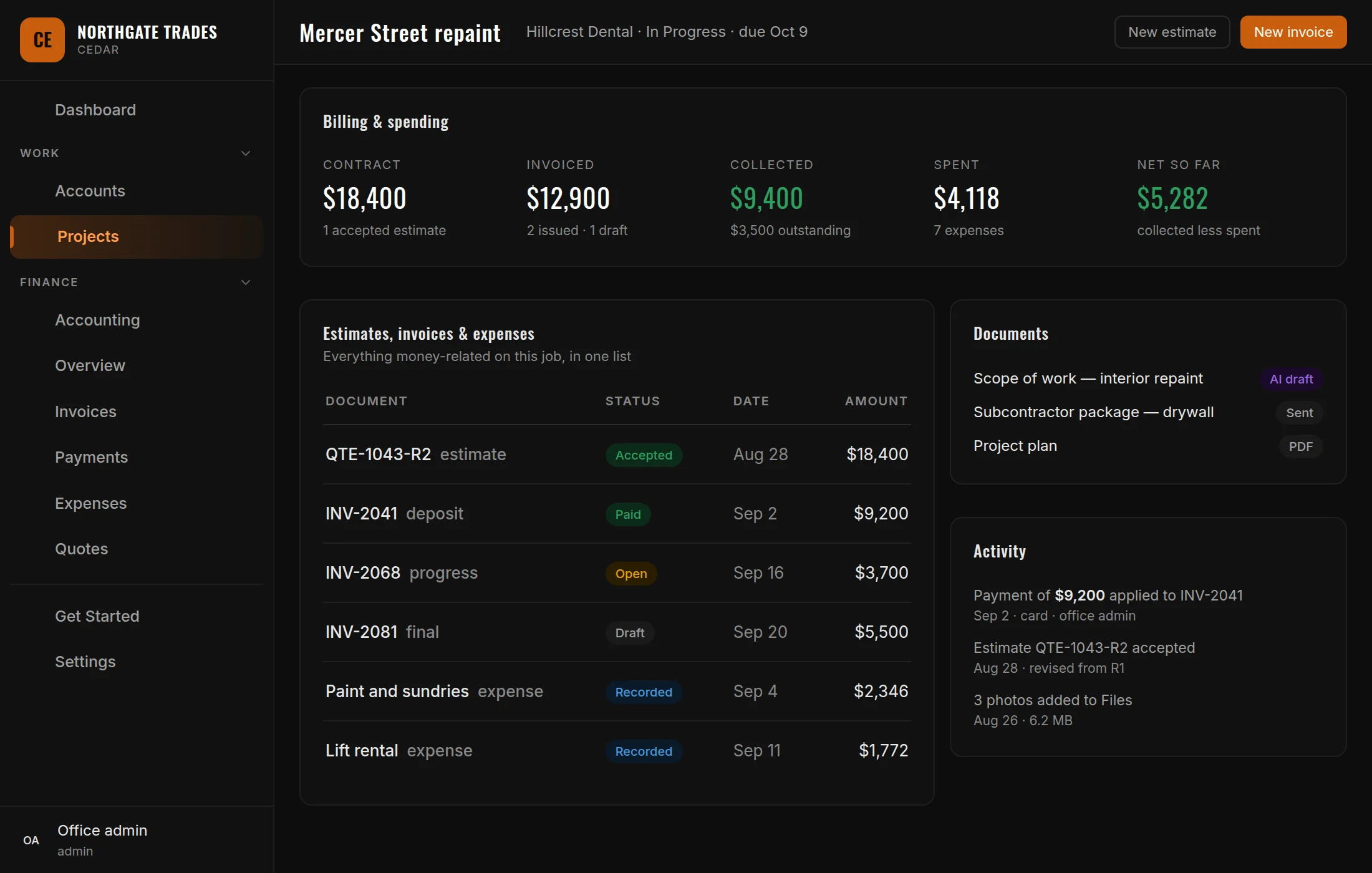
A Cedar project page: contract, invoiced, collected, spent and net so far across the top, with the job's estimates, invoices and expenses in one list beside its documents and activity.
5Ways to take money — card, bank, Cash App, cash, check
1Payout account — your own Stripe, straight to your bank
1Totals engine shared by every estimate and invoice, so they cannot disagree
0Sent estimates quietly edited — revising writes a new one
What's inside

The office side of a trade business

Projects, quotes and invoices — one chain, in that order, with the money attached to it at every step.

Customers & leads

Every customer with their contacts, their saved payment methods, what they owe, and a log of every call, email, text and walk-in. A lead is the same record before the work starts, and converting one keeps everything already written on it.

Projects

The job, with its status, dates, notes, photographs and files. Its page adds up the contract, what you have invoiced, what has been collected, what is still owed, what you have spent and what is left — from the documents themselves, not from a figure somebody keyed in.

Estimates

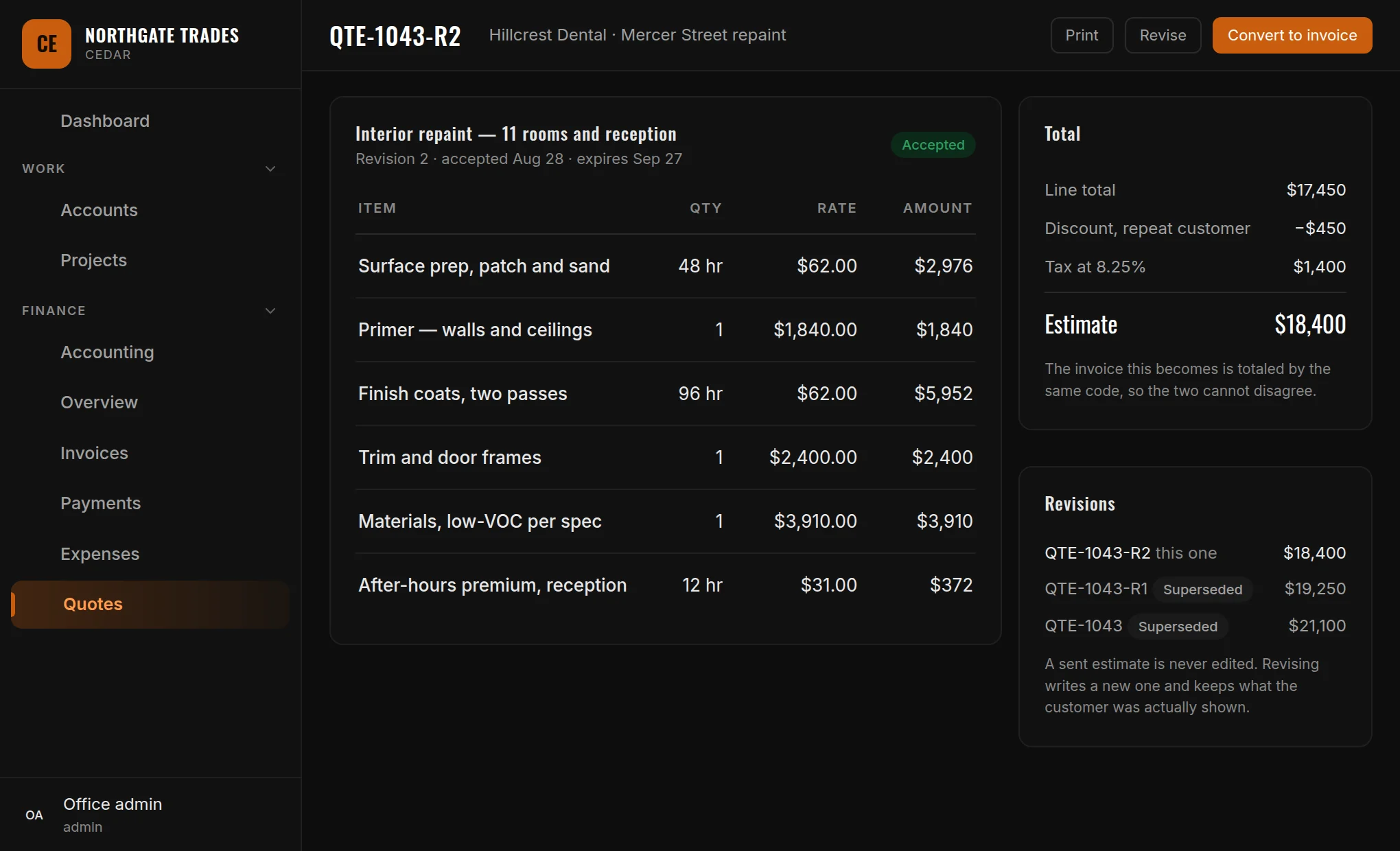
Line items with quantities and rates, discounts, tax, and a printed version to hand over. A sent estimate is never edited: revising writes a new one, numbered and linked, and keeps what the customer was actually shown. Accepting it converts it into an invoice.

Invoices & payments

Deposits, progress billing and final invoices, plus a quick charge when somebody just owes you for a call-out. Take a card, a bank payment or Cash App against a method they saved with you, or record cash and checks. One payment can cover several invoices, and the split is recorded rather than averaged.

Expenses & receipts

What the job cost you: materials, rentals, subs and fuel, each against a category and a project, with the receipt attached. Photograph a receipt and Cedar reads the vendor, total and date off it as a suggestion — what the machine read stays separate from what a person posted.

Books that add up

A cash ledger built from your payments, refunds and expenses as they happen — never a second copy of them — with opening and closing balances and a CSV export. Behind it, a chart of accounts, a general journal and a trial balance for the entries you post yourself.
Estimates

The price you gave, kept exactly as you gave it

Three revisions into a negotiation, the question is always what the customer was actually shown. Cedar answers it by never editing a sent estimate.

  • Revising writes a new numbered estimate and marks the old one superseded
  • Converting builds the invoice from the same lines, totaled by the same code — the two cannot disagree
  • Line and invoice discounts, a customer discount and tax, applied in one fixed order
  • Draft a priced scope of work with AI from your notes, photographs and plans — then price it yourself before it goes out
A Cedar estimate: line items with quantities and rates, a totals panel showing the line total, discount, tax and the estimate figure, and a revisions panel listing the two superseded versions.
Getting paid

One payment, split the way it was actually meant

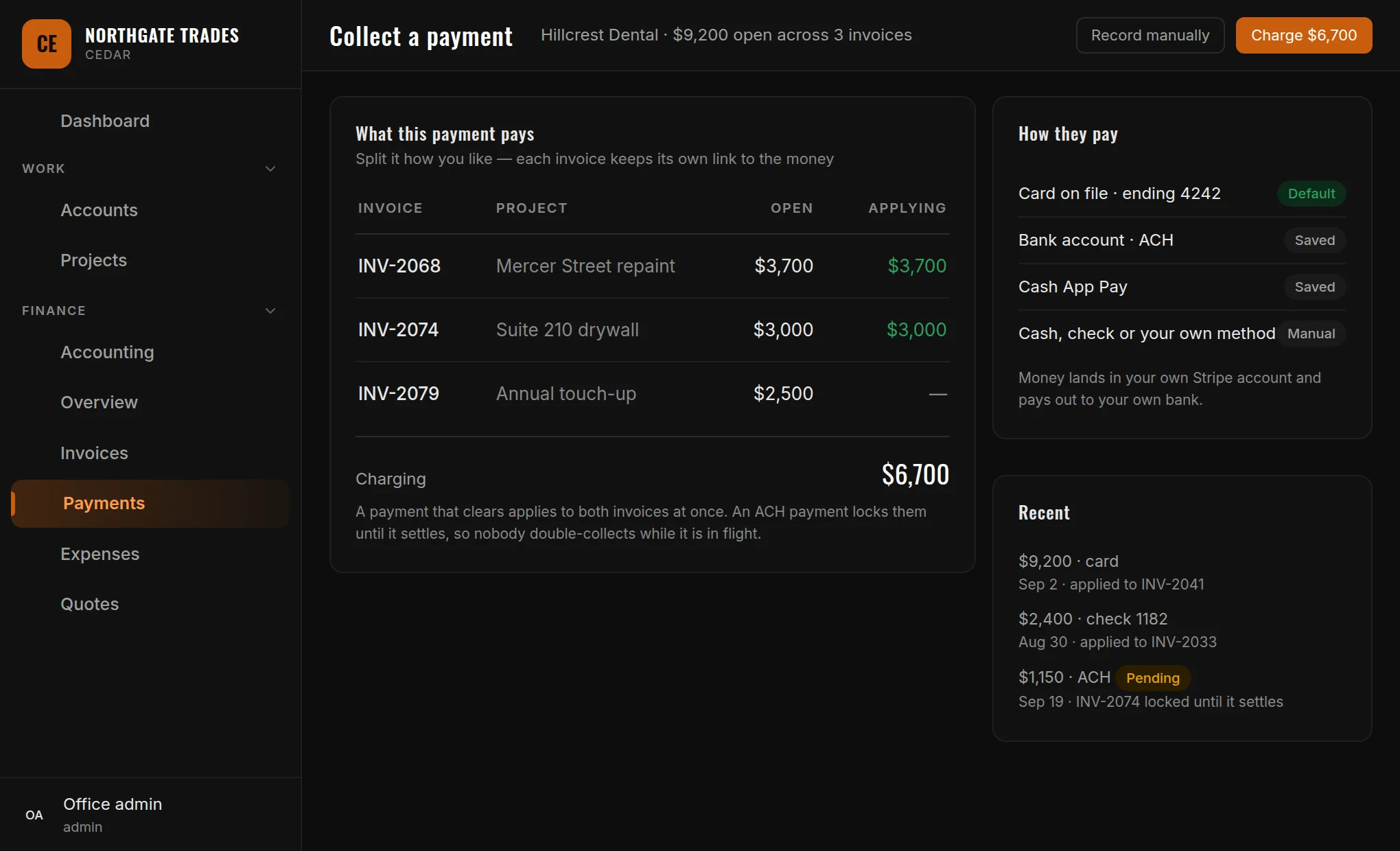
A customer who pays $6,700 against three open invoices has told you something specific. Cedar records which invoice got what, and works every balance out from those links.

  • Card, bank and Cash App against a method the customer saved with you — plus cash, check and your own methods
  • A bank payment in flight locks the invoices it covers, so nobody collects twice
  • Money lands in your own Stripe account and pays out to your own bank — we never hold it
  • Overnight, Cedar expires old estimates and flags what has gone overdue, so the follow-up is a list rather than a memory
Collecting a payment in Cedar: three open invoices with the amount being applied to each, the total being charged, the customer's saved payment methods, and recent payments including a pending bank payment.
Also in the box

The parts that save an afternoon a week

Scope documents, drafted and pricedTurn your notes, site photographs and a plan PDF into a scope of work, a project plan or per-trade subcontractor packages — then send it out, print it, or turn it into an estimate.
Your phone is a real surface, not a shrunk-down pageThe crew's view of accounts, projects, expenses and payments is built for a phone, and it installs to the home screen.
A screen lock for a shared office machineLock the screen without signing out, and unlock with your own password — so the desk in the shop is not a way into your books.
Text-message consent, captured and provableWhen a customer agrees to be texted, Cedar keeps the wording they agreed to and when — which is the part that matters if anyone ever asks.
Refunds that stay honestA refund is recorded against the payment it reverses and shows in the ledger as money going out, rather than quietly reducing what the invoice says you were paid.
A setup guide that knows what you have doneThe first week is a checklist that ticks itself off as the work gets done, rather than a manual nobody opens.
Straight answers

Common questions about Cedar

Does Cedar have jobs and work orders?

No. The work model is projects, quotes and invoices, and that is deliberate. A project is the unit of work for a customer: it gets quoted, the accepted estimate becomes an invoice, and the project page carries the contract, invoiced, collected, spent and net figures for that job.

How do customers pay?

Your office charges a card, bank account or Cash App method the customer saved with you, or records a cash, check or custom payment. The money moves through your own Stripe account and pays out to your own bank — we never hold it, and there is no second money path to reconcile.

Can Cedar email an estimate or an invoice?

Not yet. Both print, and marking one sent is your record that it went out. Emailing documents and a pay page a customer can open themselves are being built; we would rather tell you that now than have you discover it on a Friday.

Does Cedar keep real books?

It keeps a cash ledger built live from your payments, refunds and expenses, and a chart of accounts with a general journal and trial balance for the entries you post yourself. Nothing posts to the journal automatically, on purpose: a partial auto-post would make the trial balance look authoritative while it was incomplete.
Is there a portal for my customers?

Not yet. Cedar today is the office and the crew. A customer-facing view is planned, and it will read the same records rather than being a copy of them.

Can I try it now?

Cedar is in development and trials open at launch. Tell us your trade and how you quote today — that conversation shapes what ships next — and we will let you know the moment it opens.

Running a trade business?

Tell us how you quote, bill and chase payment today, and we will show you what Cedar does with it.

Get notified at launch Release notes Contact Us